STAGE1.HR
UPGRADE - LITE TO PRO
UPGRADE - LITE TO PRO
Couldn't load pickup availability
UPGRADE - V1 TO V2
UPGRADE - V1 TO V2
Here you can purchase an upgrade for all previous versions from version V1 to V2.
Previous versions: LITE - PRO - PRO MINI
UPGRADE - V1 TO V2
FREE DELIVERY ABOVE 249€
FREE DELIVERY ABOVE 249€
If the total price is 249€ or higher.
Then the delivery is free and it will be sent by the delivery service you choose the next working day.
If you use a discount code, then the free shipping is canceled.
SHIPPING
SHIPPING
DHL Express - 21€
Average delivery time 2 - 4 working days for countries within the EU
--------------------------------------------------------------------------
GLS - 9€
Average delivery time 5 - 12 working days for countries within the EU
--------------------------------------------------------------------------
- If you place your order on a working day by 1:00 PM from Monday to Friday, the order will be shipped the next day. If you order after 1:00 PM, the package will be shipped the day after tomorrow.
- All orders placed on non-working days or holidays are shipped the next working day.
- Shipment status and tracking numbers are sent immediately when the courier picks up the package.
IMPORTANT INFORMATION BEFORE USING THE DEVICE
IMPORTANT INFORMATION BEFORE USING THE DEVICE
NOTE: CAN2IP bridge device does not work if SGW is installed in the car! In this case, you can install SGW bypass.
Does my car have SGW?
- All cars manufactured after 02/2018 should have SGW installed
CAN2IP Android App
CAN2IP Android App
The CAN2IP device can be connected to our new Android application to make it easier to monitor parameters.
It can also be connected to Android Auto.
>For more information click here<
If you have purchased CAN2IP LITE, you can use this to upgrade your LITE to PRO version.
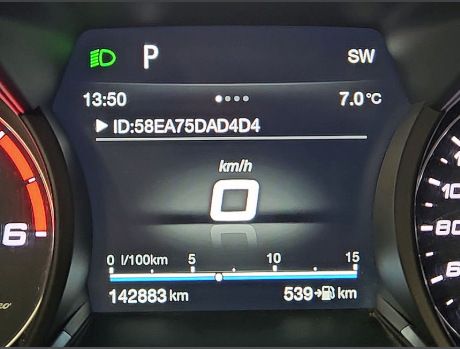
In order to prepare the upgrade for you, you need to send us your device ID.
You can find your device ID on the penultimate menu.
EXAMPLE OF WHAT IT LOOKS LIKE: ID58EA75DAD4D4
ID must contain 12 characters.
------------------------------------------------------------------------------------------------
When you purchase an upgrade, you will receive an email with the necessary instructions on how to upgrade.
You will receive an email with instructions during our business hours (8:00 AM to 4:00 PM / Monday - Friday).
If you need more information, please feel free to contact us.
------------------------------------------------------------------------------------------------
The upgrade is done by creating a hotspot on your mobile device with the name "default123" and the password "default123"
Then you go to the ID menu and hold down the RES button for a few seconds until you see "wifi connecting", then the upgrade will start. When the upgrade is complete, the device will reboot.
Share